domingo, 30 de octubre de 2022

 Como usar serilog en una API .NET 6


Instalar serilog del package nuget de Visual Studio


Buscar el archivo Program.cs del proyecto

poner en uso using Serilog;

colocar el siguiente codigo:

public class Program

    {

        public static void Main(string[] args)

        {

            Log.Logger= new LoggerConfiguration()

                .MinimumLevel.Error()//Si lo cambio por Verbose graba todo

                .WriteTo.File(@"log.txt", outputTemplate:

                "{Timestamp:yyyy-MM-dd HH:mm:ss} {Message:lj}{NewLine}{Exception}")

                .CreateLogger();


            CreateHostBuilder(args).Build().Run();

        }

        public static IHostBuilder CreateHostBuilder(string[] args) =>

            Host.CreateDefaultBuilder(args)

            .UseSerilog()//Para que se pueda usar serialog en toda la API

                .ConfigureWebHostDefaults(webBuilder =>

                {

                    webBuilder.UseStartup<Startup>();

                });

    }


Dentro del controller:

catch (Exception ex)

            {

                Log.Error("Bad request en productos activos \r"+ex.ToString());

                badRespuesta.status = "400";

                badRespuesta.errors = "Ocurrio un evento en la petición!!!";

                return BadRequest(badRespuesta);

            }

sábado, 8 de agosto de 2020

Como crear un proyecto Mobil en Blazor

 COMO CREAR UN PROYECTO MOBILEBLAZOR 


 dotnet new -i Microsoft.MobileBlazorBindings.Templates::0.4.74-preview

dotnet new mobileblazorbindings -o NombreDesuProyecto

jueves, 9 de julio de 2020

INVALID HELLO enviando un correo


Error: Server says: 550 Access Denied – Invalid HELO name
http://10.172.9.15/uploads/images/gallery/2020-02-Feb/scaled-840-0/image-1581516352432.png
SMTP Error Code
Server says: 550 Access Denied – Invalid HELO name
Solution for Error: Server Says: 550 Access Denied – Invalid HELO name
A “550 Access Denied – Invalid HELO name” SMTP error usually occurs when the SMTP Domain configured as part of an email sender’s identity does not match the senders email address.
To modify the SMTP Domain name associated with your sender identity in GroupMail, do the following.
1. Go To Tools/Account Manager and highlight the account you are sending from.
2. Click Modify
3. On the Delivery Options screen, click on the Advanced button.
4. Under the “SMTP Domain” section of the Advanced screen, click on Custom and add the domain of the email address you are sending from (i.e. gmail.com or yourdomain.com)
5. Click OK on the Advanced screen and then OK again on the Delivery Options screen to save your changes.
  
If you continue to have problems after changing the SMTP Domain name, contact the GroupMail support team. They will be happy to help you to fix it.

martes, 9 de junio de 2020

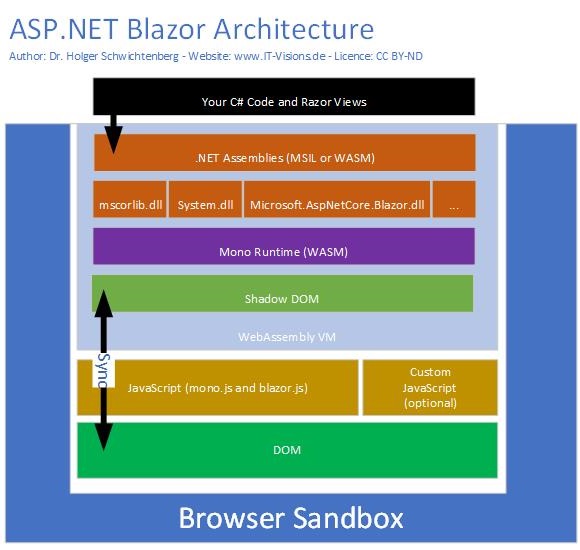
BLAZOR HOT RELOAD

BLAZOR 3.1

https://localhost:5001

dotnet  watch run debug nClient

ShouldRender:Para ver si es la primera vez que se ejecuta un componente.

https://caniuse.com 


Para verificar la correcta configuración de telerik version 2.14.0


Ruta donde se instalo el telerik:
D:\Program Files (x86)\Telerik UI for Blazor 2.14.0

Ruta donde se encuentra el VS Office Packages:
C:\Program Files (x86)\Microsoft SDKs\NuGetPackages\

Ruta del Nuget  versión:
https://api.nuget.org/v3/index.json


Para enviar un token via HTTP


 string token = "Mi token";
     

       HttpClient httpClient = new HttpClient();
       string miURL = "http://localhost/COOPCASH2/usuarios/test";
       miURL = "http://localhost/COOPCASH2/seguridad/todoslosusuarios";
      var request = new HttpRequestMessage(HttpMethod.Get,miURL);
       request.Headers.Authorization = new System.Net.Http.Headers.AuthenticationHeaderValue("Bearer", token);


          //  var enviarJSON = JsonSerializer.Serialize(usuarios);
           // var enviarContent = new StringContent(enviarJSON, Encoding.UTF8, "application/json");
          
            
         //   var responseHttp = await httpClient.GetStringAsync(miURL);

           var respuesta = await httpClient.SendAsync(request);
            //  var responseHttp2 = await httpClient.GetAsync()
           var p = respuesta.Content.ReadAsStringAsync();
          
            var a= p.Result;
            return (lista);


Para llenar con datos falsos una clase y que blazor la pueda renderizar


En el program.cs colocar esta linea:
 builder.Services.AddScoped(sp => new HttpClient { BaseAddress = new Uri(builder.HostEnvironment.BaseAddress) });


public class Usuarios
{

    public int Id { get; set; }
    public string usuario { get; set; }
    public string passwordhash { get; set; }
    public string passwordSalt { get; set; }

}


    public async   Task<List<Usuarios>> Leer(Usuarios usuarios)
    {

        try
        {
            List<Usuarios> lista =  new List<Usuarios>();
            Usuarios usr = new Usuarios() 
            {
                Id = 1, passwordhash = "pwd1", passwordSalt = "pwd3",usuario="hdelarosa"
               

            };

            lista.Add(usr);
            usr = new Usuarios()
            {
                Id = 2,
                passwordhash = "pwd5",
                passwordSalt = "pwd5",
                usuario="fperez"


            };
            lista.Add(usr);

            Console.Write(lista);

     return (lista);
        }
        catch (Exception ex)
        {

            throw;
        }